CaptionX Review: Premiere Pro Captions Workflow and Pro Pricing
CaptionX is a Premiere Pro extension for turning a selected sequence audio track into timed captions, with language, grouping and style controls before the result returns to the edit. It is most useful for editors who caption regularly and want to stay in Premiere; occasional users can begin with the free tier, while private-audio workflows should account for cloud transcription.
CaptionX is a Premiere Pro extension for turning a selected sequence audio track into timed captions, with language, grouping and style controls before the result returns to the edit. It is most useful for editors who caption regularly and want to stay in Premiere; occasional users can begin with the free tier, while private-audio workflows should account for cloud transcription.
20% off the first payment
TESTEDSEBASTIANCaptionX Pro monthly plan · US
Price checked 2026-10-23. Listed monthly subscription rate; taxes may apply. Confirm first-payment eligibility and the renewal amount at checkout.
Affiliate link. We may earn a commission at no extra cost to you. Details
Premiere Pro editors who publish captioned videos often and want transcription, editable captions, styling and SRT output in the same editing workflow.
You need audio to remain entirely on your own device, require firm compatibility confirmation before trying a plugin, or caption only occasionally and the free tier already covers your needs.
Captioning is one of the last repetitive steps in a finished edit: choose language, transcribe speech, correct the words, break the lines, style them and export a subtitle file or captioned video. CaptionX puts that workflow in an Adobe Premiere Pro extension. It starts from the audio already in a sequence and returns generated captions to that edit, so editors can work without first moving a video into a separate captioning app.
CaptionX is a good fit when you publish spoken videos often and want more control over the presentation than a plain transcript. If captions are an occasional task, the free tier is the sensible starting point. The important trade-off is that the selected audio leaves the editing computer for cloud transcription. That matters even though the product page says the video itself is not uploaded for this workflow.
A caption workflow that stays in Premiere
After installing CaptionX on Windows or macOS, the official download guide says to open Premiere Pro and choose Window → Extensions → CaptionX. The panel asks for a caption language and an audio track from the active project. If the track list is empty, the help guide says to add audio to the sequence and refresh the list. Captioning the wrong track can give you the wrong speaker or no useful dialogue, so this selection is worth checking before generation.
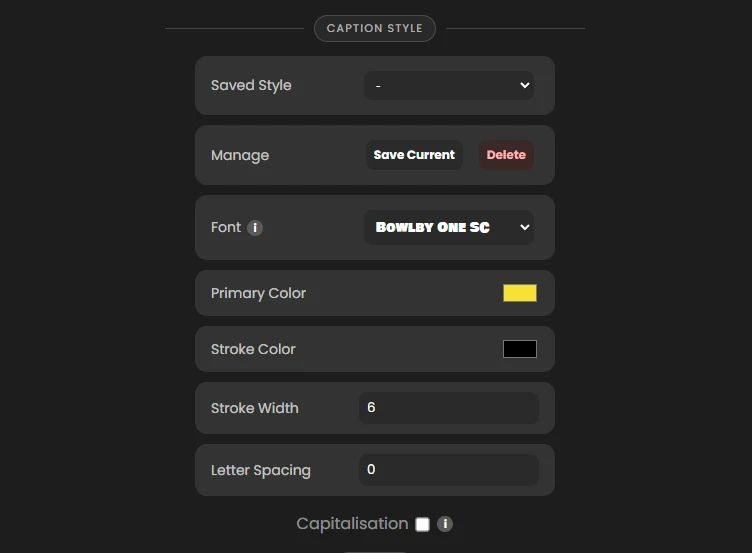
The next decisions shape the caption rhythm. CaptionX offers single-word captions, a Medium setting that averages roughly three or four words, and a custom group size from one to ten. Then you can generate unstyled captions for later editing in Premiere, apply a style within CaptionX, or use an animated style. The panel screenshot above shows controls for saved styles, font, color, stroke and letter spacing; the guide also shows a preview before generation.
CaptionX says it exports the chosen audio track, transcribes it, and adds the captions to the current sequence. Its Premiere product page also advertises SRT export, which is useful when a client or platform needs a separate subtitle file. The brand’s product material describes a transcript review-and-edit step before applying the finished captions. That puts the editor in the right place to catch names, product terms, acronyms and punctuation before the captions are styled and delivered.
The output still needs a human pass. A clean waveform or fluent sentence is not proof that a proper name, number, technical phrase or second speaker was recognized correctly. Check the transcript against the dialogue, then watch the captions in context for timing, line breaks and readability. Caption style can make a short-form clip feel more deliberate, but animation should support the words rather than make every line compete with the footage.
Who should choose Pro?
CaptionX’s free plan includes five caption generations and says no credit card is required. That is enough to check whether the extension fits your editor and whether its transcript workflow saves steps on a representative project. A paid plan makes more sense for repeated publishing or for someone who also wants CaptionX’s other listed tools. The Pro tier includes unlimited use of several tools subject to fair use, while eye-contact correction is capped at 30 minutes a month. CaptionX lists video and audio transcription files up to two hours; its terms also describe daily audio-hour limits and say fair-use limits can change.
The official price page listed Pro at $13.95 per month or $139 per year on October 23, 2026, with the yearly plan marketed as two months free. Paid subscriptions auto-renew at the same interval until canceled, according to the current terms. The list price is the best comparison point if you only want to caption in Premiere; include the rest of the bundle only if those tools solve work you already do.
CameraTested’s partner offer lists TESTED or SEBASTIAN as alternative codes for 20% off the first payment. Use one code, not both, and do not assume the discount carries into a renewal. When I selected monthly Pro and continued, CaptionX sent the browser to its login page before exposing a coupon field. I could not verify eligibility for this exact plan or an after-code amount, so the price above remains the listed rate. Check the order summary and renewal terms before subscribing.
Privacy and practical limits
CaptionX says its Premiere caption workflow sends only the selected audio to the cloud for transcription, not the full video. Audio can still contain a client’s voice, interview details or unreleased narration. If your work has a local-processing requirement or consent limits, confirm that this processing path is acceptable before using the extension. CaptionX’s general privacy policy is older than its current terms, and these sources do not establish a caption-audio retention period; we do not infer one.
You also need a working Premiere Pro installation and a CaptionX account for its extension. The download page lists installers for Windows and Mac and says one account serves its supported editors. Check the current installer against your exact Premiere version before a deadline; the materials reviewed here do not establish support for every version. If CaptionX’s extension is unavailable or not appropriate for a project, Premiere’s built-in transcription or a separate subtitle tool may be a better fit.
Buying recommendation
CaptionX is worth considering for editors who caption speech often and want transcript editing, visual styling and subtitle export close to the timeline. The free tier offers a low-commitment way to assess the workflow. Pro’s monthly price is clear, but the code’s first-payment benefit should be treated as a checkout offer rather than a guaranteed reduced price: confirm that the exact plan accepts your code and compare the amount due today with the renewal amount.
What we like
- Works as an extension inside Premiere Pro and returns the captions to the active sequence
- Lets you choose language, caption length and unstyled, styled or animated output
- Provides a free tier with five caption generations and no credit card requirement
- Offers SRT export and a cloud workflow that sends audio rather than the full video
What to know
- Caption transcription sends the selected audio track to CaptionX's cloud service
- Transcripts still need human review for names, technical terms, punctuation and timing
- Paid subscriptions renew automatically; Pro use is subject to changeable fair-use limits
- The 20% partner code is for the first payment only, and exact eligibility for this plan was not confirmed in checkout
Key specs
| Product | CaptionX for Adobe Premiere Pro |
|---|---|
| Platforms | Windows and macOS |
| Install | CaptionX installer or Adobe Creative Cloud; Window → Extensions → CaptionX |
| Caption grouping | Word, Medium (about 3–4 words on average), or Custom (1–10) |
| Caption styles | Unstyled, Styled or Animated; preview, fonts, colors, stroke and spacing |
| Caption output | Active Premiere sequence; SRT export is also advertised by CaptionX |
| Pro plan | $13.95/month or $139/year listed; fair-use terms apply |
Questions
What is the discount code for the CaptionX Premiere Pro Captions Extension?
The CaptionX discount codes are TESTED or SEBASTIAN for 20% off the first payment at caption-x.com. Use one code per order. Eligibility for this exact product or variant is unconfirmed. Use TESTED or SEBASTIAN as alternative codes for 20% off the first payment. Use one code, not both. This offer does not promise a discount on later payments.
Who is the Premiere Pro Captions Extension best for?
Premiere Pro editors who publish captioned videos often and want transcription, editable captions, styling and SRT output in the same editing workflow.
Who should skip the Premiere Pro Captions Extension?
You need audio to remain entirely on your own device, require firm compatibility confirmation before trying a plugin, or caption only occasionally and the free tier already covers your needs.
How does CaptionX create captions in Premiere Pro?
Choose the language and audio track in the CaptionX extension, set how words are grouped, choose a style and generate. The official guide says CaptionX transcribes the selected track and adds the resulting captions to the active sequence.
Does CaptionX upload my full video?
CaptionX's Premiere Pro product page says its caption workflow sends only audio to the cloud for transcription, not the video. That still matters for private interviews, client work and unreleased material; check the current terms and get the necessary permission before processing sensitive speech.
Is CaptionX Pro worth paying for if I only need captions?
Start with the free plan if five caption generations cover your use. Pro is a broader tool bundle: CaptionX lists Premiere Pro captions among its fair-use-limited tools, plus transcription, translation and editing utilities. Compare the full plan against your actual monthly workload.
What does the CaptionX discount code save?
CameraTested lists TESTED or SEBASTIAN as alternative codes for 20% off the first payment, not both and not later renewals. The monthly Pro checkout asked for a login before showing a coupon field, so this review shows the $13.95 listed rate without calculating an after-code price. Verify the amount and renewal rate before paying.