BOYA CM40 USB Desktop Microphone Review
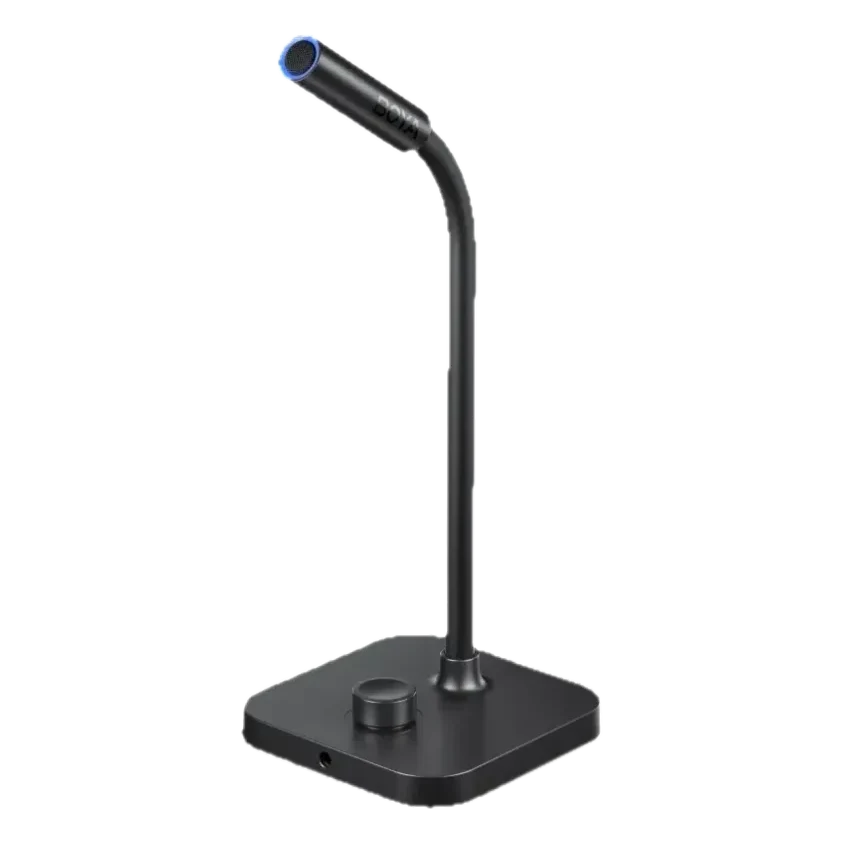
The BOYA CM40 is our pick for streamers, remote workers and podcasters who want clean voice on a desk without a mixer or an audio interface. It plugs into a phone, tablet or computer over USB-C with no drivers, adds a built-in 192 kHz/24-bit sound card, cuts background noise with ENC and gives you a real-time headphone jack and a gain knob with one-touch mute.
The BOYA CM40 is our pick for streamers, remote workers and podcasters who want clean voice on a desk without a mixer or an audio interface. It plugs into a phone, tablet or computer over USB-C with no drivers, adds a built-in 192 kHz/24-bit sound card, cuts background noise with ENC and gives you a real-time headphone jack and a gain knob with one-touch mute.
$69.99 listed · Save $7.00
10% off
FRIEND-6GTP4T3CM40, 192 kHz/24-bit sound card · US
Price checked 2026-10-25. Before tax and shipping. Based on the listed price; final price at the retailer.
Affiliate link. We may earn a commission at no extra cost to you. Details
Streamers, remote workers, voice-over artists and podcasters who record at a desk and want a simple USB mic with monitoring and a gain knob.
You record away from a desk, need XLR connections for a studio mixer, or want a handheld or wireless microphone.
A desk microphone should do one thing well: make your voice sound clear with as little setup as possible. The BOYA CM40 is built around that idea. It is a USB-C microphone with its own sound card, so there is no interface to buy and no drivers to install, and the controls you need most are right on the base. We recommend it for streamers, remote workers and podcasters who want a clean, simple desk setup.
Plug in and record
The CM40 connects to a phone, tablet or a macOS or Windows computer over USB-C, and BOYA says no drivers are needed. The built-in sound card in the CM40 version runs at 192 kHz and 24-bit, which gives your recordings plenty of headroom for calls, streams and voice-overs. The 9.7mm capsule handles loud voices, up to 100 dB SPL, and ENC reduces background noise by up to 35 dB to keep the focus on your voice.
Controls where your hand already is
A rotary knob on the base adjusts gain between 0 and 30 dB and doubles as a one-touch mute, which is a big help on a call or a live stream when you need to cough or step away. A dedicated 3.5mm headphone port lets you monitor your own voice in real time without latency, so you can hear what the audience hears. Together those details make the CM40 feel closer to a small studio mic than a plain USB stick.
CM40 or CM30
BOYA lists both models on the same product page. The CM40 has the 192 kHz/24-bit sound card and is the version we recommend for most buyers who want the best recording quality at the lowest practical price. The CM30, at 48 kHz/16-bit, is a lower-cost option if you only need a mic for calls and basic streaming.
Where it fits
Pair the CM40 with a desk, a laptop or a phone stand and you have a complete voice setup in a minute. For on-camera or run-and-gun work, a wireless lavalier is a better tool; our BOYA BY-V4 wireless microphone review covers a kit for that, and our lavalier vs shotgun microphone guide explains how to choose between mic types.
Buying recommendation
Choose the BOYA CM40 if you record or stream at a desk and want a plug-and-play USB-C mic with monitoring and gain control. Skip it if you need XLR, a portable or wireless microphone, or a mixer-based studio setup.
Use code FRIEND-6GTP4T3 for 10% off at BOYA; the price box above shows the listed and with-code prices. The BOYA offer page has the code and shopping button.
What we like
- USB-C plug and play with phones, tablets, macOS and Windows, with no drivers
- Built-in 192 kHz/24-bit sound card in the CM40 version
- ENC noise reduction of up to 35 dB for cleaner voice capture
- A 3.5mm headphone port for real-time monitoring without latency
- A rotary knob adjusts gain from 0 to 30 dB and mutes with one touch
What to know
- It is a desktop mic, so it is not the right tool for on-the-go or on-camera recording
- USB connection means no XLR, so it will not drop into a mixer-based studio
- The cheaper CM30 version has a lower 48 kHz/16-bit sound card
Key specs
| Model | BOYA CM40 |
|---|---|
| Reviewed variant | 52272091988257, CM40 192 kHz/24-bit |
| Sound card | 192 kHz/24-bit (CM40); the CM30 version is 48 kHz/16-bit |
| Capsule | 9.7mm, handles up to 100 dB SPL |
| Noise reduction | ENC, up to 35 dB |
| Connection | USB-C; phones, tablets, macOS and Windows; no drivers needed |
| Monitoring | 3.5mm headphone port, real time |
| Controls | Rotary knob for 0 to 30 dB gain and one-touch mute |
| US listed price | $69.99 for the CM40 |
Questions
What is the discount code for the BOYA CM40 USB Desktop Microphone?
The BOYA discount code is FRIEND-6GTP4T3 for 10% off at boya-mic.com. For CM40, 192 kHz/24-bit sound card, the estimated price is $62.99 USD with FRIEND-6GTP4T3, before tax and shipping (2026-10-25). Eligibility for this exact product or variant is unconfirmed. Referral offer. Open the referral link to view eligibility and redemption instructions; confirm the discount before payment.
Who is the CM40 USB Desktop Microphone best for?
Streamers, remote workers, voice-over artists and podcasters who record at a desk and want a simple USB mic with monitoring and a gain knob.
Who should skip the CM40 USB Desktop Microphone?
You record away from a desk, need XLR connections for a studio mixer, or want a handheld or wireless microphone.
Do I need drivers or an audio interface?
No. The CM40 has a built-in sound card and connects by USB-C to phones, tablets and computers running macOS or Windows without drivers.
What is the difference between the CM40 and the CM30?
BOYA sells both on the same page. The CM40 has a 192 kHz/24-bit sound card, and the CM30 has a 48 kHz/16-bit sound card at a lower price.
Can I monitor my voice while recording?
Yes. A 3.5mm headphone port provides real-time monitoring with no latency, and the rotary knob sets gain and mutes the mic.
How does ENC help?
ENC, or environmental noise cancellation, reduces background noise by up to 35 dB, which helps a voice stay clear in a room with a fan, keyboard or traffic.